LesveDome is rejuvenated as LesveDomeNet
Last update 1st Oct, 2026
Introduction
At beginning, the LesveDomeNet driver was designed for HomeDome from Technical Innovations,
in the mean time it has been used on various dome brands : Ash, Exploradome, Sirius and DIY.
The basic dome control is based on a USB I/O controller, 2 relays, an Azimuth sensor and a
Home position switch. USB I/O interface is one of the main advantages of this solution as Serial
ports (RS232) are less and less available on new PC's.
The USB I/O interface is the Velleman module K8055N or also known as WSI8055N http://www.velleman.eu/products/view/?id=404880
A list of resellers is provided at the end of this page.
It's also possible to control the dome shutter with additional relays.
LesveDomeNet driver is an ASCOM dome driver, complying all the ASCOM specifications.
 To use this LesveDomeNet driver, you have to install the latest version of ASCOM Platform (6.1 SP1), this ASCOM Platform is free.
Download it from http://ascom-standards.org/
To use this LesveDomeNet driver, you have to install the latest version of ASCOM Platform (6.1 SP1), this ASCOM Platform is free.
Download it from http://ascom-standards.org/
LesveDomeNet driver can be also used to control a Roll Off Roof (ROR). In this case, the ROR is seen
as a shutter by LesveDomeNet driver.
A complete description and electrical schematic is available at the following page.
LesveDomeNet driver is available on my download page
To download the driver you need to subscribe to lesvedome groups.io
The old discussion group on Yahoo is transfered to groups.io
Quick links
Discussion group //https://groups.io/g/lesvedome/
LesveDomeNet - Download page
LesveDomeNet Documentation
The schematics
Dome Synchronisation
UNIWERSAL dome : a useful user feedback from Kris
This feedback is also useful for other users as it explains in details how to solve problems many users encounter when installing LesveDomeNet
K8055 Dome Diagnostics program - written by Steve Hennerley
K8055 documentation and demo program as provided by Velleman
New version
The new version of LesveDome is named LesveDomeNet. It was time to rejuvenate LesveDome. Indeed LesveDome was written in VB6 (Microsoft Visual Basic 6). From several years, Microsoft is no more supporting VB6 and we don't know when VB6 softwares will stop working due to some future change in the Windows platform. The new LesveDomeNet software is written in VBNet and takes all advantages of the new ASCOM platform 6.0 SP1. The LesveDomeNet is fully compatible with the old version of LesveDome and you don't have to change your existing wiring. LesveDome was only using one K8055 board and had limited functionalities besides dome control. With the new version it's possible to control two K8055 boards, one for the dome driver and another one to control what you want in the observatory.
LesveDomeNet Distribution and Registration policy.
LesveDomeNet is a shareware with a free trial of 60 days. During this period you will be able to complete your Dome Automation project and you will receive the needed support. My LesveDomeNet development activity is not commercial. This service is given with pleasure. The license fee amount is 50 Euros. See the details on the download page
Registration key for the old version of LesveDome.
If you already have a permanent license for the old LesveDome and need a new registration code because you are using a new PC, just ask for it. I will continue to provide it for free as agreed at the registration time.
Upgrade from LesveDome to LesveDomeNet
If you already have permanent license for the old version, the upgrade fee for the new LesveDomeNet is 25 Euros. You will notice that the "Local codes" for LesveDome and LesveDomeNet are different and the registration codes are not interchangeable. As a registered user, obviously you may also receive a trial code of LesveDomeNet.
LesveDomeNet users
Currently more than 260 amateur observatories are automated with LesveDome or LesveDomeNet.
They are located in USA, UK, Spain, Korea, France, Australia, Finland, Ukraine, Germany, Canada, Japan, Poland,
Taiwan, Italy, Belgium, Netherlands, Mexico, New Zeeland,....
LesveDome - LesveDomeNet user's list
The LesveDomeNet has been successfully implemented with DIY, Exploradome, Sirius and recently Uniwersal domes.
Here you will find how Erik Bryssinck
has rewired his Uniwersal system to use LesveDomeNet.
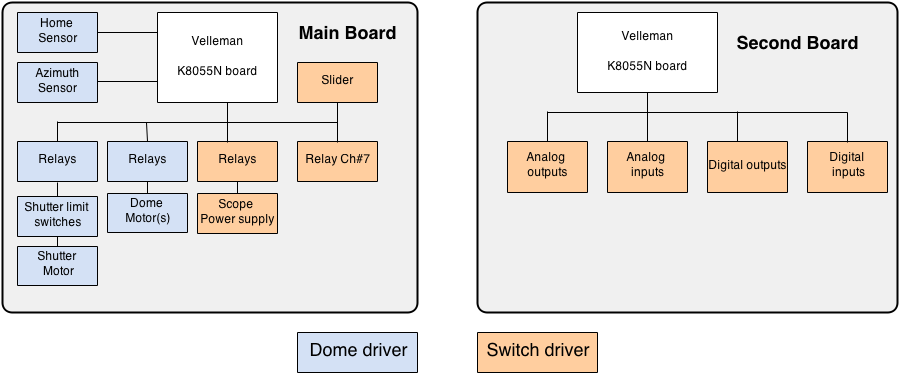
Hardware Block diagram
One or two USB I/O boards (K8055N from Velleman) may be used.
At the software point of view, two entities exist: a Dome driver and a Switch driver. In the next diagram the functions controlled by
the Dome driver are represented in blue and Switch driver functions in orange. The Main board is controlled by Dome and Switch drivers.
The second optional board is controlled by Switch driver. According ASCOM specification a "Switch" may be read or written (Digital Input - Digital Output).
A "Switch" may have multi-states (Analog input - Analog Output). Velleman board K8055 has 5 Digital Inputs, 8 Digital Outputs, 2 Analog Inputs and 2 Digital Outputs.
USB I/O controller
The USB I/O controller is available as a low cost kit K8055N (39 Euros) or as
mounted module VM 110N (55 Euros) from Velleman (a Belgian company
www.velleman.eu ) but the product is also available from various
resellers all over the world (see Velleman resellers at end of this page). Mounting this
module is easy is you have a good soldering iron, Velleman
documentation provides a step by step procedure to mount all the
elements. With the module you receive also a test software to verify all the functions. Specifications:
http://www.velleman.eu/products/view/?id=404880
The K8055N board is replacing the obsolete K8055 board. LesveDomeNet supports the old and new versions.
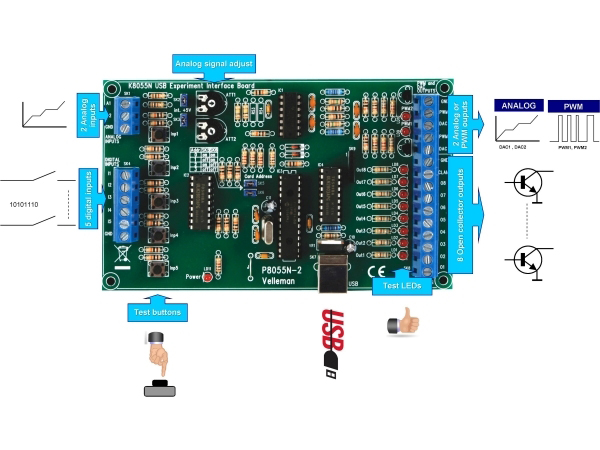
Two digital outputs
are used to activate motor relays.
- ON/OFF relay
- Clockwise/Counterclockwise direction relay
The position of the direction relay is also sensed with USB I/O, so if the dome is rotated with manual switches (see electrical diagrams in the help file provided at end of this page), the ASCOM LesveDomeNet driver will be aware of this dome move.
Azimuth sensor
The Azimuth sensor of Technical Innovations (http://www.homedome.com)
is based on wheel in contact with the Dome base. As the wheel is
contact with the dome base, this wheel will rotate when the Dome is in move. You could also
consider buying only the two photo sensors from an electronic
retailer and making yourself the mechanic instead to buy and adapt the
Technical Innovation Azimuth sensor for your dome. Azimuth sensor is
just an arm with a spring supporting the azimuth wheel and the two photo sensors.
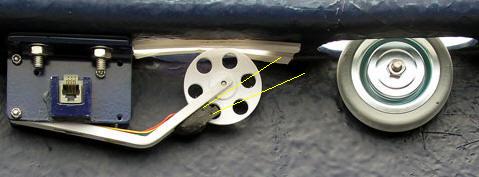
The two photo sensors, shown with yellow lines are Omron EE-SX1042, Google provides a
lot of links for this component.
Specifications http://ecb.omron.com.sg/pdf/photomicrosensors/non-amplified/EE-SX1042.pdf
Eberhard Poguntke has designed his Azimuth sensor with 3D Printer. Have look at his website page
https://www.poguntkeweb.de/sternwarte/diekuppelsteuerung/
The website is in German, but Chrome browser translates it nicely.
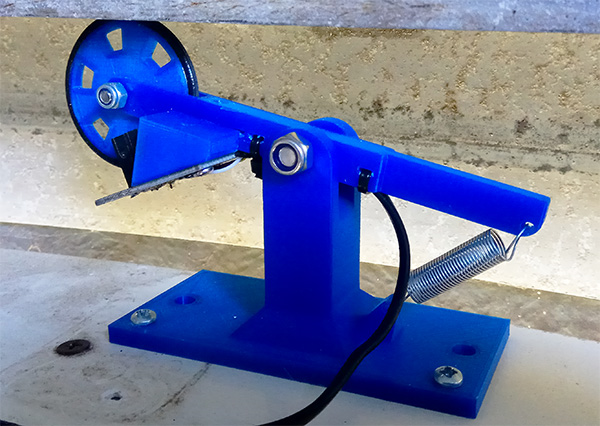
For Exploradome users a specific design is also available.
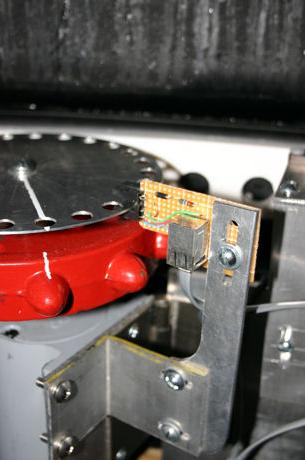
A complete description of this Azimuth sensor is available in the Help file (see below).
LesveDomeNet software
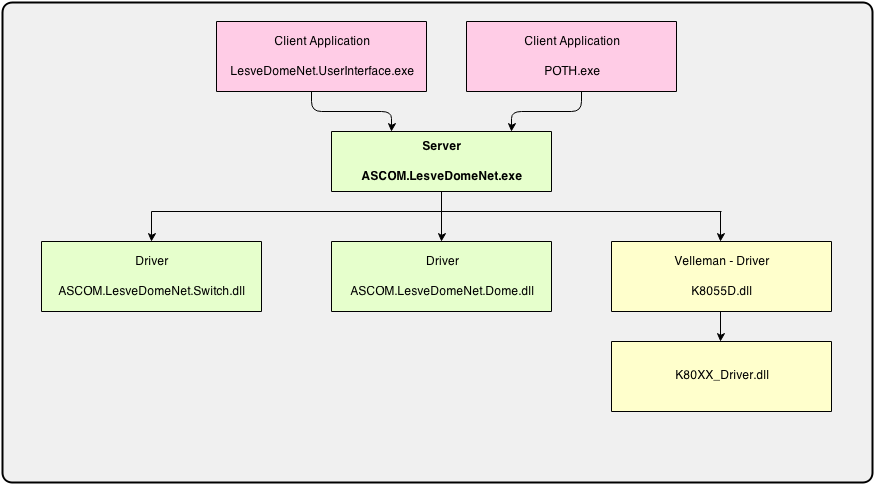 LesveDomeNet is based on the concept of ASCOM LocalServer. An ASCOM LocalSever provides a way to allow multiple
driver types to use the same hardware and also allow multiple applications to connect to the same driver.
LesveDomeNet is a Dome driver and also a Switch driver.
The LocalServer program "ASCOM.LesveDomeNet.exe" is automatically opened by application programs like POTH, ACP, a.s.o.
The LocalServer is running silently in the background and has no human interface.
An application program "ASCOM.LesveDomeNet.UserInterface.exe" may be used by the user to interact with the driver in parallel to other
application programs like POTH, a.s.o. The Setup window may be opened with application programs (POTH, ACP, LesveDome UserInterface).
The registration form is accessible from the Setup.
LesveDomeNet is based on the concept of ASCOM LocalServer. An ASCOM LocalSever provides a way to allow multiple
driver types to use the same hardware and also allow multiple applications to connect to the same driver.
LesveDomeNet is a Dome driver and also a Switch driver.
The LocalServer program "ASCOM.LesveDomeNet.exe" is automatically opened by application programs like POTH, ACP, a.s.o.
The LocalServer is running silently in the background and has no human interface.
An application program "ASCOM.LesveDomeNet.UserInterface.exe" may be used by the user to interact with the driver in parallel to other
application programs like POTH, a.s.o. The Setup window may be opened with application programs (POTH, ACP, LesveDome UserInterface).
The registration form is accessible from the Setup.
Human interface
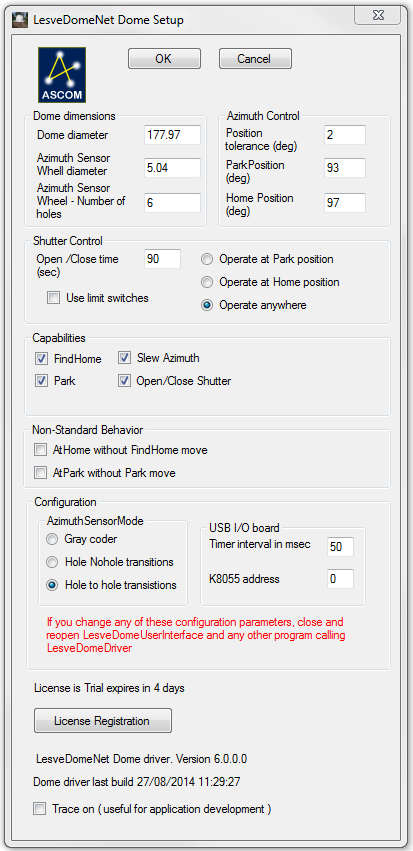
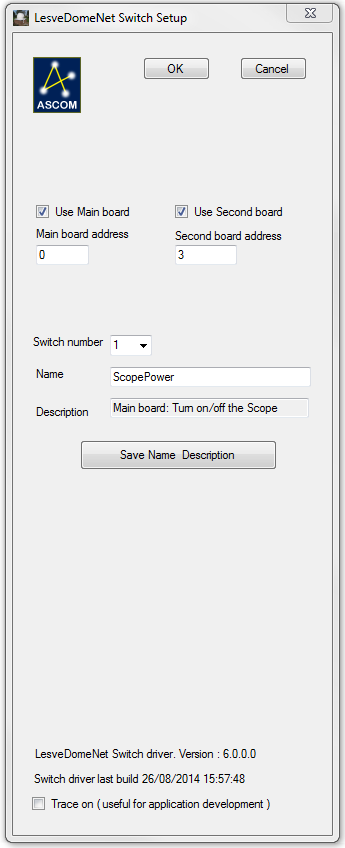
The main window of the application program "ASCOM.LesveDomeNet.UserInterface.exe" has two "Tabs" : Dome and Switch
The "Switches" numbered 1, 2 and 3 are belonging to the Main board are controlled by the Switch driver. The other "Switches" numbered from 4 to 20 are
related to the optional secondary board and also controlled by the Switch driver.
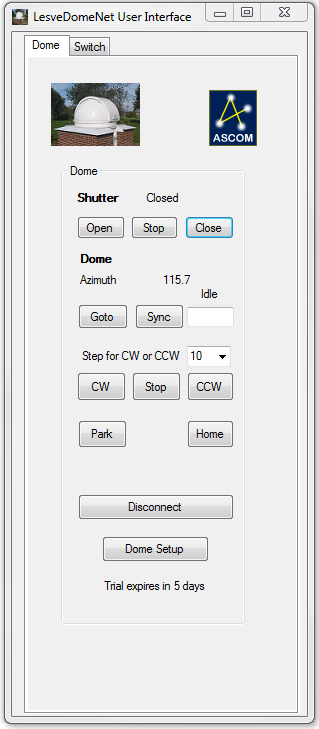
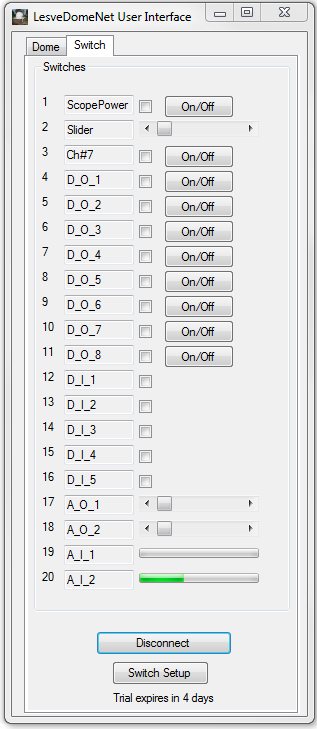
Dome driver and Switch driver have their own Setup window, where you specify the hardware configuration.
 -
-
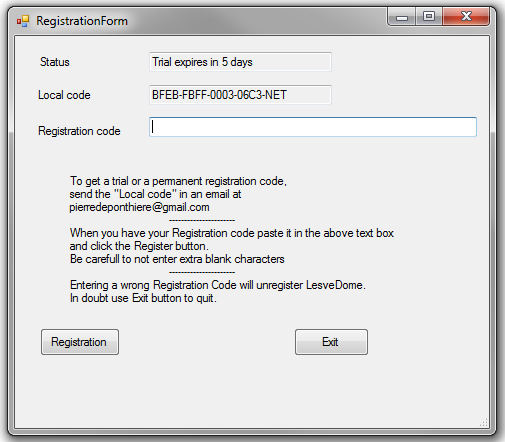
The registration form is called from the button "License Registration" of Dome Setup window.
To obtain a registration code, you have to send me the "Local code" by email at
pierredeponthiere@gmail.com or at
pierre@dppobservatory.net
and you will receive a trial or permanent registration code
If you already have the old version of LesveDome, you will notice that the "Local codes" are different
and the registration codes are not interchangeable.
Documentation
A complete description of LesveDomeNet driver is provided in the following documentation file : LesveDomeNet.chm. To avoid problems when opening the LesveDomeNet.chm file use the following procedure.
- Download LesveDomeNet.chm
- move it to a convenient directory
For Windows security reasons, you have to "Unblock" the file.
- right click on LesveDomeNet.chm and select Properties
- at the bottom of the Properties window, you will see a button named "Unblock"
click on this button - click the OK of the Properties window
- the Help file LesveDomeNet.chm may be opened without problem
Double click on LesveDomeNet.chm to open it.
The documentation is also available in pdf format:
Download LesveDomeNet.pdf
Direct link to schematics and Utilities
Those schematics are also available in the lesvedomedriver.chm file.
Principal schematic (Charles Harrow)
Shutter-Relay_Schematic-DennisHohman.pdf
Dual Shutter Configuration
A useful tool to test your Azimuth encoder (Thanks to Steve Hennerley)
MagicWire folder (Thanks to Hugh Gilhespie)
Dead Man Switch
Sirius Implementation
This Excel file Configuration.xls helps to evaluate your configuration.
LesveDomeNet driver download
installation program (Setup) is available on my download page
Velleman resellers
http://www.ramseyelectronics.com/
http://www.apogeekits.com/usb_interface.htm
http://store.qkits.com/moreinfo.cfm/VM110
http://www.oceancontrols.com.au/
http://www.jaycar.com.au/ keyword search "usb kit"
http://www.jaycar.co.nz/ keyword search "usb kit"
http://www.maplin.co.uk/module.aspx?moduleno=42857
Links suggested recently by users
https://www.velleman.eu/products/view/usb-experiment-interface-board-wsi8055n/?id=461858
https://www.esr.co.uk/shop/contents/en-uk/search.php?searchphrase=k8055n&start_page=1&searchFormSortBy=R-A&searchFormRootUse=A
https://www.amazon.de/dp/B0085L02H2?ref=ppx_yo2ov_dt_b_fed_asin_title
Dome synchronisation
To synchronize the dome to the telescope, you have to use another program like ASCOM.DeviceHub or NINA or ACP from dc3.com
ASCOM.DeviceHub or ACP will use LesveDomeNet as the dome driver and they will slave the dome to scope.
The "Geometry parameters" in their setup program have to be defined correctly (signs and units).
In the next figure, the point O is the center of the dome
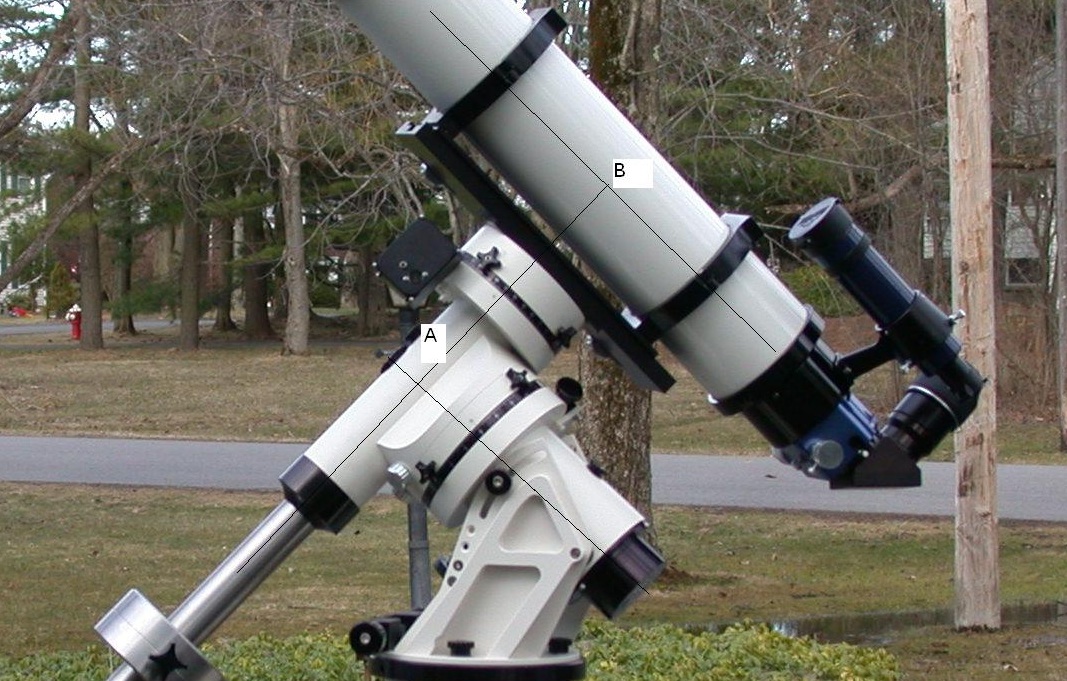
and P is the intersection of telescope polar and declination axes (the point A in the telescope picture).
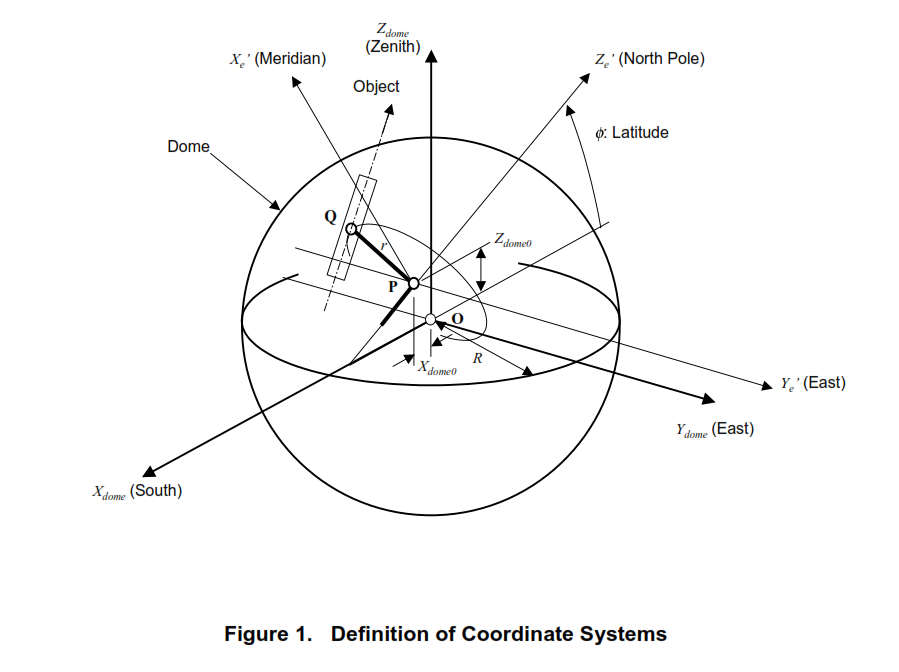
In ASCOM.DeviceHub you have to enter
- X Y Z ( the offset of the point P in respect to point O)
- the dome radius.
- GEM Axis Offset (distance of A to B, see telescope picture), for a fork mount enter GEM = 0
If the geometry parameters are not measured with precision, the dome slit will not correctly follow the scope.
The link
http://www.brayebrookobservatory.org/BrayObsWebSite/HOMEPAGE/BRAYOBS PUBLICATIONS.html
provides links to the dome synchronisation work of John Oliver and Chris Lord.
For your facility, I put here a copy of the principal document.
John Oliver and Chris Lord didn't use the same convention for the X offset, in their article and figure
X is counted positively in South direction but ASCOM.DeviceHub counts X positivelty in North direction
Another interesting document : dome_synchronisation.pdf
If you are looking for dome_synchronisation function in Visual Basic, here is the code used by ASCOM Dsync.txt
Recently I found that this DomeSync program is no more available from www.brayebrookobservatory.org website.
So I have put here a copy I have kept. DomeSync.zip
The zip file also contains the program sources.
Another interesting DomeSync program available at Hall's Harbour Observatory (Nova Scotia Canada)
http://www.dulcemelos.ca/en/articles/domesync.asp
Chris Rowland is withdrawing his Dome Geometry Optimiser, as it seems not to be reliable.